Next.js is NOT React
After using Next.js for a number of years, I realized I was thinking about it completely wrong. Next.js is NOT React. It requires a different mindset. Historically, I've built Next apps like React apps that run on the server, but that's probably the wrong approach to using Next.js and I'll explain why.
2025-10-15 Justin Jordan

Static site generation has been a passion of mine since the good old Gatsby days. The idea of building a dynamic web app that has the performance of a static website intrigued me. However, in this industry as technologies come and go, I continuously find myself becoming excited about the next big thing, which in my case was Next.js.
Next.js originally caught my attention with its static site generation ability. It seemed like the logical successor to Gatsby. However, Next.js came with so much more than static site generation. It's fullstack React! It's a Node.js app and React app rolled into one codebase. Sure, it can do static generation, but it can also be a RESTful API. Or you can straight up query a database within a React component. It's wild!
I like that Next.js feels quite vanilla. Unlike Gatsby, it can be somewhat unopinionated, which can be a good thing or a bad thing depending on your experience level. There are certain things in Next.js you have to do, like following the folder structure patterns laid out in the documentation. But once you've created a page component you're in React land. From there you can build your app like a React app, and if you're a React developer like me, it's easy to fall back on React habits.
That's the trap.
React habits are not bad habits. React is excellent at what it does. The problem is that Next.js is not merely React with better routing and a server attached. Next.js is a framework for deciding where code runs, when data is loaded, how much JavaScript ships to the browser, and what gets cached along the way. If you ignore those decisions, you're still using Next, but you're probably not getting the reason you chose it in the first place.
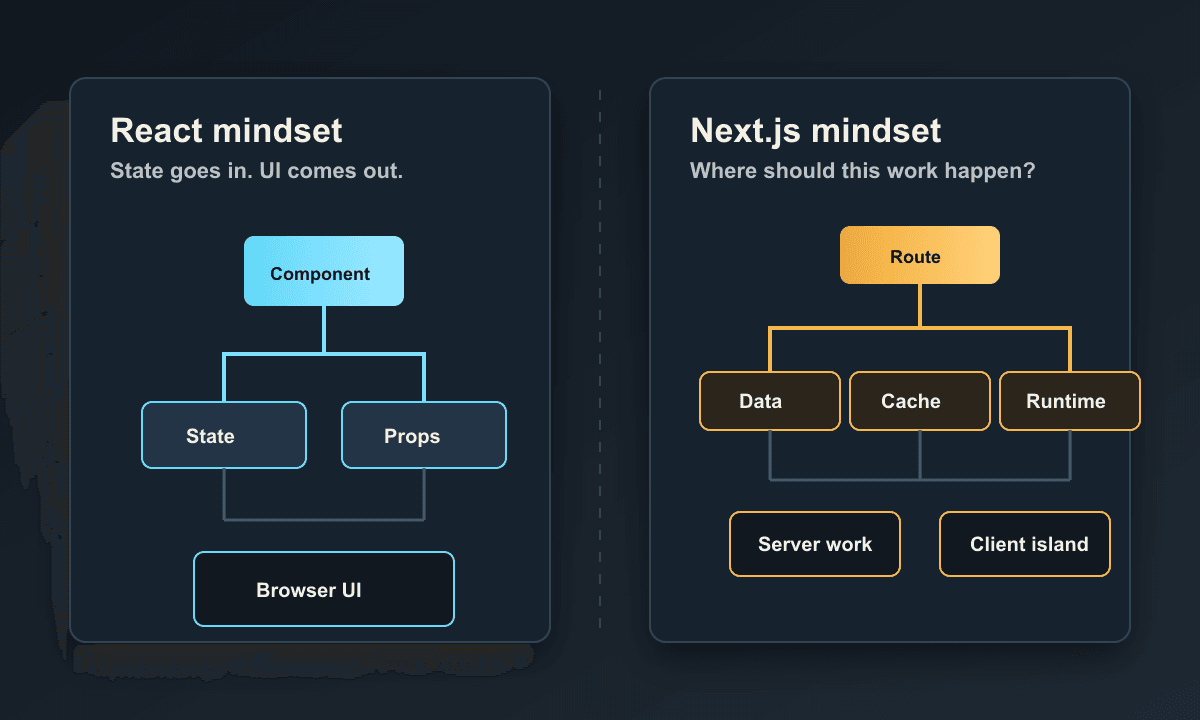
React Is the UI Layer
React's mental model is refreshingly focused. You build components, pass props, manage state, and respond to user events. When something changes, React re-renders the relevant pieces of the UI. The browser is where most of the interesting work happens, and the server is often just the place that delivered the JavaScript bundle.
That's not a criticism. For a lot of apps, that model is exactly right. If you're building an internal dashboard, an embedded widget, a highly interactive single page app, or a feature that mostly lives after the page has loaded, React gives you a straightforward way to think: state goes in, UI comes out.
Next.js changes the shape of the problem. The UI still matters, of course, but the route is now a major unit of architecture. The server is not just a bundling detail. The filesystem is not just organization. Data fetching is not just something you tuck into a hook. The framework wants you to think about the whole request lifecycle.
I used to think about Next as, "React, but I can fetch on the server." That sounds close enough, but it's incomplete. It's like describing a restaurant as, "a room where food appears." Technically true, but you're missing the kitchen, the staff, the timing, the menu, and all the other pieces that make the experience work.
Server Components Are the Default
In modern Next.js, components are server components by default. That one sentence is easy to read and weirdly hard to internalize.
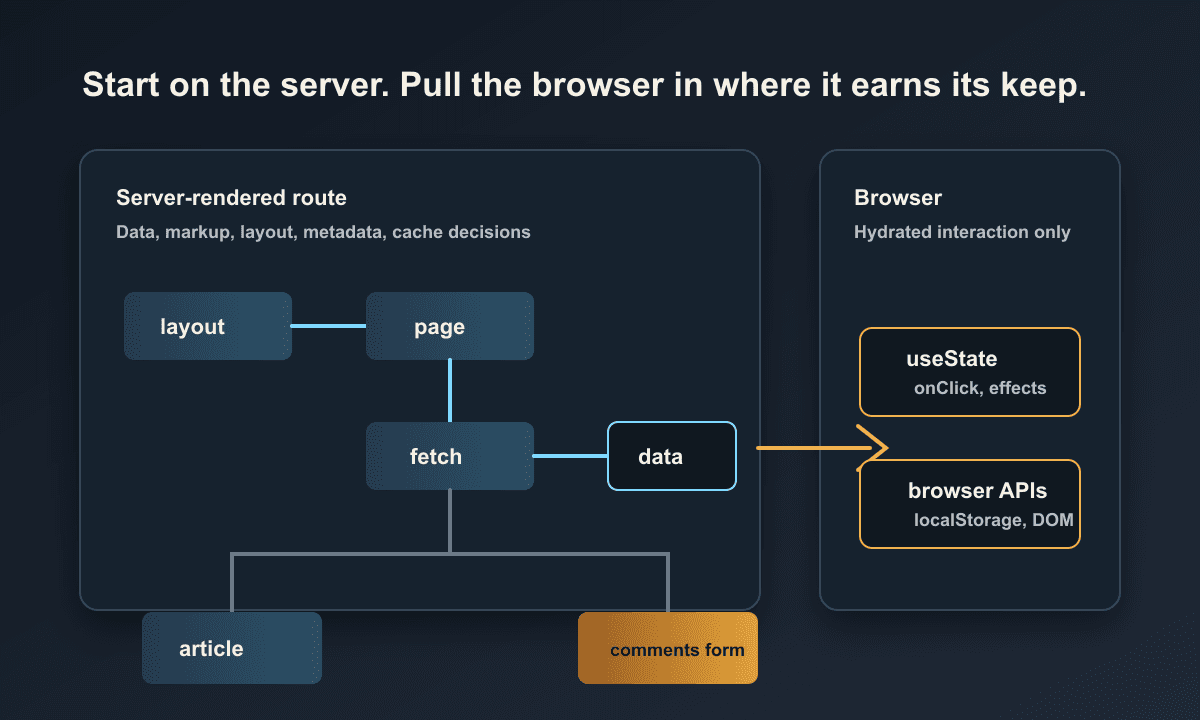
When you write a component in the App Router without adding use client, you're writing a component that renders on the server. It can read files, call server-only code, fetch data, and avoid shipping its component code to the browser. It cannot use client-side hooks like useState, and it cannot attach event handlers like onClick.
Client components are the ones that behave more like typical React components. They can use state, effects, refs, browser APIs, and event handlers. They can also be rendered to initial HTML on the server, which is where the naming gets confusing, but their interactive code still has to ship to the browser and hydrate.
So the question is not, "Can I build this in React?" The question is, "Which parts of this page actually need to be interactive in the browser?"
If the answer is "not much," that's great! Keep most of the tree on the server. Let the server gather the data and produce the markup. Then carve out small client components for the bits that need state or event handlers.
If the answer is "basically everything," that's also useful information. Maybe that page should be heavily client-side. Or maybe Next is not buying you much for that particular project. That's not a failure. Sometimes the right call is to just build a React app and enjoy your life.
The Boundary Matters
The use client directive is not a magic sprinkle you add when TypeScript yells at you. It creates a boundary.
Once a file is marked with use client, the components imported into that client entry point become part of the client bundle too. That does not mean every child component in your entire app suddenly becomes client-side, but it does mean you should be intentional about where the boundary starts.
This is where React instincts can get expensive. In a normal React app, it's natural to put state high in the tree and pass data down. In Next.js, putting state too high can accidentally drag a lot of code into the browser. You might start with one harmless useState, then suddenly a whole layout, chart library, and a mountain of components are part of the client bundle because they all live below that boundary.
The better habit is to push interactivity down. Keep the page, layout, and data-loading pieces on the server when possible. Then create small islands of client behavior where the user actually needs to click, type, drag, toggle, or otherwise do browser things.
Data Fetching Is Architecture
In a React app, data fetching often starts in useEffect, moves into a custom hook, then maybe graduates into a query library once the app gets complex. That's a perfectly reasonable progression for client-side apps.
In Next.js, reaching for useEffect as the default data fetching tool usually means you're skipping one of the main benefits of the framework.
Server components can fetch before the page is sent to the browser. That means the user can receive meaningful HTML instead of a spinner and an empty shell. It also means database queries and private tokens can stay on the server where they belong. The browser does not need to know how the sausage is made, and frankly, it should not be invited into that conversation.
This changes how I think about pages. A page is not just a component. A page is a data boundary. It can decide what must be loaded for the initial render, what can stream in later, what can be cached, and what truly needs to wait for client interaction.
That is a very different mindset from "render first, fetch later."
Caching Is Part of the Job
Caching is where Next.js starts to feel less like React and more like infrastructure wearing a React-shaped jacket.
With a normal client-side React app, caching is usually something you manage in memory, in a query client, or in the browser. With Next.js, caching can happen at several layers: during the build, during a request, in fetch behavior, in route output, and potentially in your hosting platform. That power is great, but it also means you have to understand what kind of freshness your page actually needs.
Some pages can be generated once and barely touched again. Some can be regenerated periodically. Some should be dynamic on every request. Some can mix static outer structure with dynamic inner pieces. The framework gives you a lot of ways to choose, but you do have to choose.
This is where I think developers get frustrated. We want caching to be an optimization detail. In Next.js, it's more like a design decision. If you do not make that decision intentionally, the app might still work, but it can surprise you later. And as every developer knows, surprise caching behavior is not the fun kind of surprise.
Mutations Need a Place to Live
The same thing happens with mutations.
In a client-side React app, a form submission usually calls an API endpoint. You can absolutely still do that in Next.js with route handlers, and sometimes that's the right move. Route handlers are especially useful when you need an HTTP interface, a webhook, an upload endpoint, or something that non-React clients will call.
But Next.js also gives you server actions, which let you wire certain mutations closer to the component tree. That can make forms feel pleasantly direct: submit the form, run server code, update the relevant data, and re-render what needs to change.
I don't think that means every mutation should become a server action. Tools are not identities. The point is that Next gives you multiple places to put server behavior, so you need to think about the contract you're creating. Is this a reusable API? Is it a form action? Does it need to be called outside the app? Does it update cached data? Does it need redirects or validation?
Those are framework questions, not just React questions.
The Filesystem Is Not Just Folders
The App Router also makes the filesystem part of the application model. A folder can define a route. A layout can wrap nested routes. A loading file can describe a pending state. An error file can create a local error boundary. A not-found file can shape what happens when a route is missing. Metadata can live near the route it describes.
At first this can feel like magic, and I tend to be suspicious of magic. I spent enough time with Gatsby plugins to know that magic is great right up until it isn't.
But the Next filesystem conventions are not magic in the same way. They're more like a map. You can glance at the app directory and understand how the application is shaped. Routes, loading states, error states, layouts, and metadata live close to each other. Once you accept that the filesystem is part of the framework, it starts to feel less like ceremony and more like useful organization.
You still have to be careful. If your app directory turns into a junk drawer, the conventions won't save you. But if you use the route structure intentionally, it can make large apps easier to reason about than a pile of manually configured routers and provider wrappers.
When I Reach for Client Components
I don't want this to sound like client components are bad. They are not. Interactivity is the whole reason many websites are worth using.
I reach for client components when I need:
- Local state that changes as the user interacts with the page
- Event handlers like clicks, input changes, keyboard shortcuts, or drag and drop
- Browser APIs like
localStorage,window, media queries, or observers - Third-party libraries that expect to run in the browser
- Optimistic UI or interactions that should feel instant
That's plenty of stuff! The difference is that I try not to make the whole page client-side by default anymore. I start with the server, then pull the browser in where it earns its keep.
When Next.js Might Be Too Much
This is the part that feels weird to say after writing an article about thinking more deeply in Next.js, but here goes: you do not always need Next.js.
If you're building a small interactive widget, a static marketing page with no meaningful server behavior, or an app where everything happens after login in a highly client-side interface, plain React with a bundler might be simpler. You could also reach for something like Svelte, which I've been excited about for years because it keeps the output lean and the component model direct.
Next.js shines when the server and the UI need to cooperate. It shines when routes have real data requirements, when SEO matters, when performance depends on sending useful HTML quickly, when caching matters, when forms and mutations live close to the app, and when you want frontend and backend concerns to share a codebase without becoming a total mess.
If none of that matters, Next can still work. It just might be more framework than you need.
The Mindset Shift
The big mindset shift is this: React asks, "What should the UI look like for this state?" Next.js asks, "Where should this work happen?"
Should this run at build time? On the server for every request? In a cached server render? In a route handler? In a server action? In a tiny client component? In the browser after hydration?
Those questions can feel annoying at first. I just want to build the thing! But once they click, they become useful. They force you to stop treating the browser like the default location for all work. They make you think about what the user needs immediately, what can be deferred, what should never leave the server, and what JavaScript is actually worth shipping.
That's why I no longer think of Next.js as simply React with a backend. React is still the UI layer, and it's a great one. But Next.js is the application framework wrapped around it. The sooner you treat it that way, the more the framework starts working with you instead of feeling like React with extra rules.
Let's Wrap Up
For years, I built Next apps with a React-first mindset. I would reach for client components quickly, fetch data like I was building a single page app, and think of server rendering as a performance bonus. That works, but it leaves a lot on the table.
Next.js is at its best when you let it be Next.js. Start with the route. Think about the server. Keep client components focused. Treat caching as part of the design. Put mutations where they make sense. Use the filesystem conventions instead of fighting them.
React is still in there. You still get components, composition, and all the good stuff that made React worth learning in the first place. But if you approach Next.js as though it is only React, you'll probably end up confused by the parts that make it powerful.
And honestly, that's a shame, because once the mental model clicks, Next.js is pretty rad.
Resources
Next.js App Router Documentation